Hey everyone! I got some great feedback on the last issue — the one where I talked about why I didn't upgrade Claude. A lot of you asked me to share more examples like that. Real products, real moments where something didn't work for me, and how I'd change it.
I love that. I think being radically self-aware about your own reactions as a user is the best growth hack you'll ever get. Only when you know what works for you and what doesn't can you separate empty tricks from real tactics. So I want to do more of this.
And I have an offer for you.
Below you can submit any product for me to review in one of the next issues. Your product, a competitor's product, something you use every day — anything. I'll go through everything, and if the case looks interesting, I'll publish it.
→ Want me to look at a product you're curious about? Submit names or links here:
Submit a product for behavioural review in Ghosted
Now, to this week's case.
The Find
Mymind is a personal AI assistant for saving things you find online — bookmarks, images, notes. A digital second brain.
A friend recommended it to me a while back, and because of that I came in with more trust than usual. I've been on the lowest tier for months now, mostly just saving bookmarks. They have a bunch of features on more expensive plans, but I honestly have no idea why I'd need any of them. Nobody's shown me.
Recently I opened the app and got hit with this:
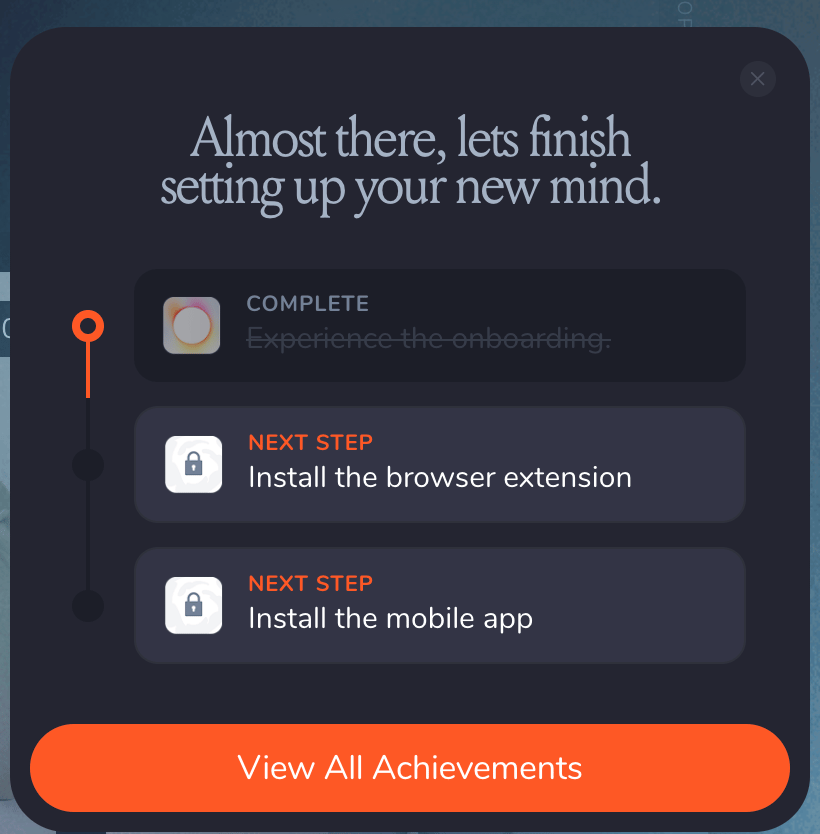
Three problems with this.
It doesn't know what I've done.
I already have the browser extension. The checklist doesn't care. It's showing me a task I completed weeks ago, which tells me immediately that this flow is generic. It's not reading my behavior, it's broadcasting a script.
It doesn't tell me why I would ever need it
Install the mobile app — okay, but for what? What changes for me after I do it? What can I do on mobile that I can't do now? The checklist gives me a task with zero connection to a result I'd actually want.
It's completely disconnected from anything I'm actually doing
I wasn't in the middle of saving something and wishing I had the mobile app. I wasn't trying to do a thing that required the extension. The checklist just... appeared. Like homework I didn't ask for.
And look, checklists are one of the most recommended onboarding patterns out there. Every PLG playbook mentions them. But most of the time, they're the thing that looks like it does the job without actually doing it. They give teams a sense of progress — "we have an onboarding flow!" — while teaching users absolutely nothing about why the product matters to them.
Are you onboarding users through a passive checklist, or through the work they came to do?

Why these mistakes make users ghost
Psychologists spent decades researching a framework called "desirable difficulties." The core finding: passive exposure creates a feeling of familiarity that people mistake for learning. Active generation (where you produce something yourself) creates encoding that actually sticks, with retention gains of 50–60%.
Map this onto onboarding. A passive checklist says "install the extension." You read it, maybe you do it, but nothing about the experience connects the feature to a result you care about.
A contextual nudge works the opposite way. Instead of listing features for users to tick off, you surface a feature during the task where it's useful. The user discovers it by doing, not by reading. They generate the experience themselves — and that's what sticks.
Nobody upgrades because they finished a to-do list. They upgrade because they hit a result worth repeating. Passive checklists skip the result entirely.
Your AI is resolving tickets. Is it keeping customers?

Resolution rates look great. But Gladly's 2026 Customer Expectations Report reveals the metric most CIOs are missing — and what the data says about where AI investments actually translate into retention, not just throughput.
The Playbook
What a contextual nudge looks like in practice:
The same week I got Mymind's checklist, something completely different happened in Google Sheets. I was working in a spreadsheet and saw this:
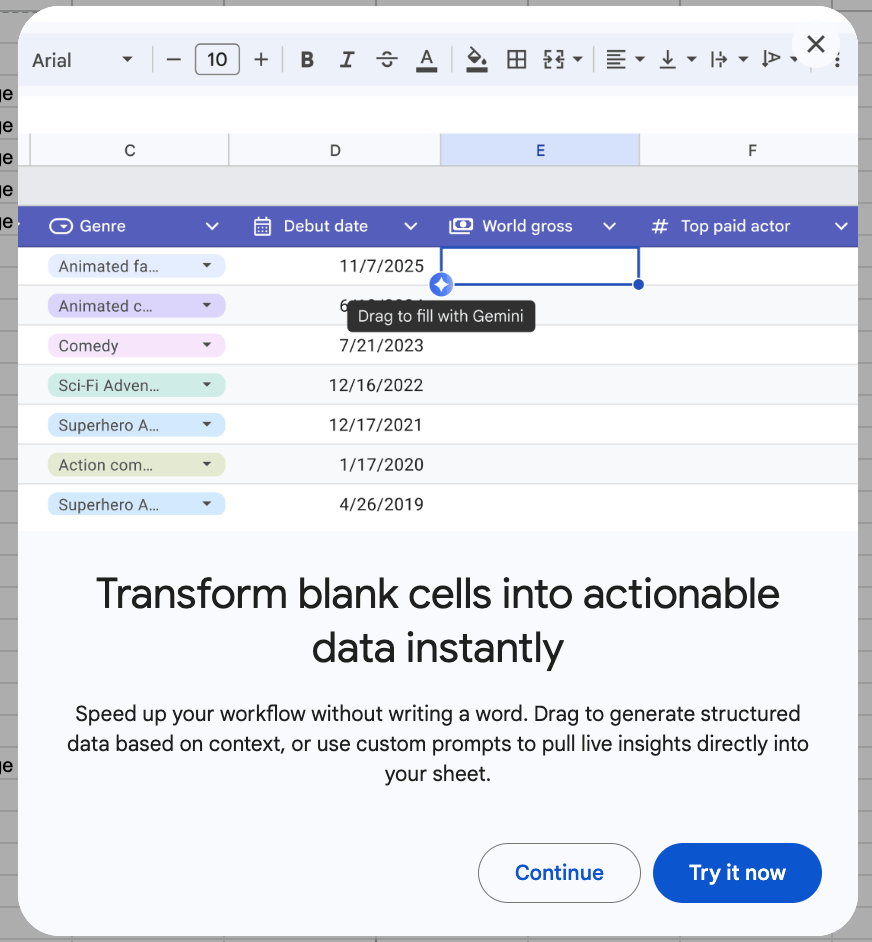
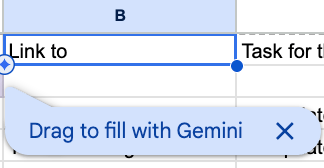
No onboarding step. I was mid-task, and a new AI feature appeared exactly where it would be useful. One drag gesture to try it, on my actual data.
Google introduced an advanced capability at the right moment, through an activity I was already engaged in, aimed at improving the task I was already doing.
That's a contextual nudge. Mymind showed me a checklist and hoped I'd learn. Google Sheets put a capability in front of me while I was working and let me use it.
When to use contextual nudges:
Any time you need users to discover features beyond the basics. Every feature has a moment where it's most useful. The question is whether you introduce it there, or dump it in a checklist and hope for the best.
How to use it:
1. Trigger it from the task, not from a list.
The Google nudge appeared because I had blank cells next to filled columns. It read my context and showed up at the right moment. Mymind's checklist didn't know I already had the extension. If your prompt can't adapt to what the user has actually done, it's broadcasting, not helping.
2. Lead with the outcome I want, not the action your OKR needs.
The first thing Google showed me was "Transform blank cells into actionable data instantly." The result I'd get, before asking me to do anything. Mymind said "Install the mobile app." A chore with no visible payoff. Name what changes for the user before you ask them to act.
3. Let them try it right there.
Google gave me a "Try it now" button and a one-gesture drag. I could experience the feature on my own data without leaving my spreadsheet. Mymind gave me a padlock icon and a task to complete somewhere else. If the user has to leave their current flow to try the feature, most won't bother.
When it backfires:
If your product needs sequential setup before anything works (connecting a CRM, importing data, configuring permissions) you can't wait for a mid-task moment because there's no task yet.
In that case, use a guided setup with inline previews: show what the user will be able to do after each step, with real examples from their data or use case. The principle stays the same: connect every setup action to a visible outcome, even if that outcome is a few steps away.
If you forget everything, remember this:
A passive checklist tells users what to do. A contextual nudge lets them do it. The gap between those two is the gap between reading about your product and experiencing it. And nobody upgrades because they read a to-do list.
🎉 Woow, you finished the issue, that’s awesome!
Hi, I’m Anastasia Kudrow, and I write Ghosted.
I am also a product growth consultant. I help SaaS teams apply psychology and PLG to build growth they can actually control. I run my own project, Growing Pains, and also work with one of the leading PLG consulting agencies, ProductLed, led by Wes Bush.
Feel free to follow me on LinkedIn:
https://www.linkedin.com/in/anastasia-kudrow/
Or check out my website, maybe we can work together: https://www.growingpains.consulting/
See you next week!