In partnership with

Hey everyone! I wanted to give Anthropic money this week. Like, actually wanted. Was mid-task in Claude, hit my limit, and wanted to keep going. Four screens later I clicked Cancel. Why? Because of 3 mistakes that no one should repeat.
The Find
You know what Claude is. I'm a paying Pro subscriber. I use it for work every day.
So I hit my session limit. The banner pops up: "You've hit your session limit" with a "Keep working" button. Pretty good CTA, and the placement is right where it needs to be.
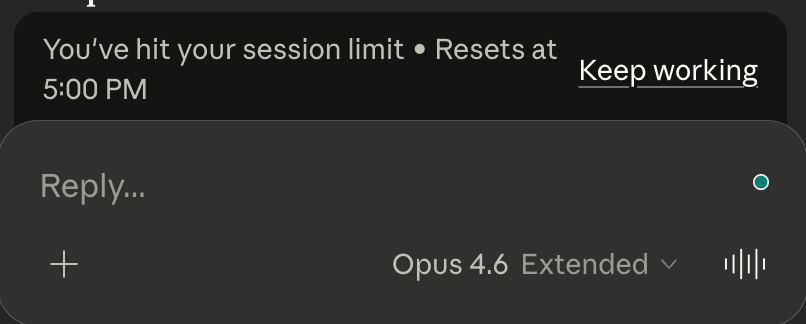
I clicked it. Picked "Pay per message." And then the product showed me this:
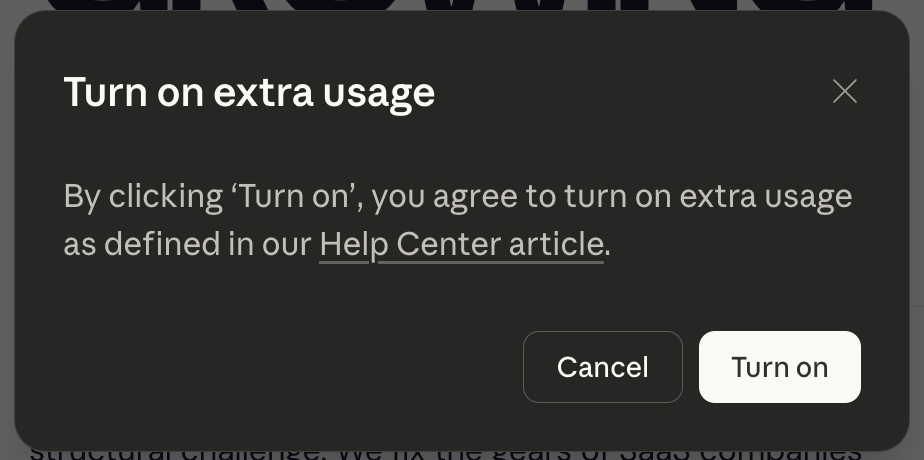
I stared at this screen for two full minutes. Then I closed it. Here’s why:
I had no idea how much I'd be paying.
The screen says "extra usage" but nothing about cost. Not a range, not a per-message rate, nothing. The only hint is a link to a help center article (good luck with that). I'd have to leave this modal, open a new tab, read a support page, and come back. For a spontaneous purchase. Nobody does that.
I couldn't tell if this was one-time or recurring.
"Turn on extra usage" sounds like flipping a switch. Switches stay on. Would this charge me once? Would it auto-charge every time I hit my limit? I have a credit card with a large limit linked to it.
That distinction is the difference between "I'll spend a few bucks today" and "I’ll be charged $2000 tomorrow because I got into an argument with AI."
I had no clue what would happen when I clicked "Turn on."
They have my card on file. Would clicking charge me immediately? Or would I get another screen to pick an amount? I was sitting there doing mental risk math for a purchase I'd already decided to make.
Does your payment confirmation actually answer these three questions? Before the button, not after?
88% resolved. 22% stayed loyal. What went wrong?

That's the AI paradox hiding in your CX stack. Tickets close. Customers leave. And most teams don't see it coming because they're measuring the wrong things.
Efficiency metrics look great on paper. Handle time down. Containment rate up. But customer loyalty? That's a different story — and it's one your current dashboards probably aren't telling you.
Gladly's 2026 Customer Expectations Report surveyed thousands of real consumers to find out exactly where AI-powered service breaks trust, and what separates the platforms that drive retention from the ones that quietly erode it.
If you're architecting the CX stack, this is the data you need to build it right. Not just fast. Not just cheap. Built to last.
Why these mistakes make users ghost
When people can't see the terms of what they're buying, they don't just hesitate. They value the whole offer below its worst realistic outcome.
Gneezy, List, and Wu ran this across over 1,000 participants. People paid $38 for a guaranteed $50 gift card. But for a coin flip between $50 and $100? Only $28. The better deal felt worse because the outcome was fuzzy. They called it the uncertainty effect.
Claude's screen does exactly this. I would've happily paid $5-$15 to keep working. But the screen wouldn't tell me what I'd pay, whether it was recurring, or what the button would do. So the whole offer collapsed.
For upgrades, the kill chain is short: fuzzy terms, perceived risk, no click, lost revenue. Keep in mind: this is how you lose the users who already wanted to say yes.
The Playbook
When this matters:
Any time you ask users to pay for anything. But especially when the decision is supposed to be fast. Mid-task, at a usage limit, inside a flow where stopping to think means losing momentum. If you want the user to move quickly, your screen has to do the thinking for them.
How to use it:
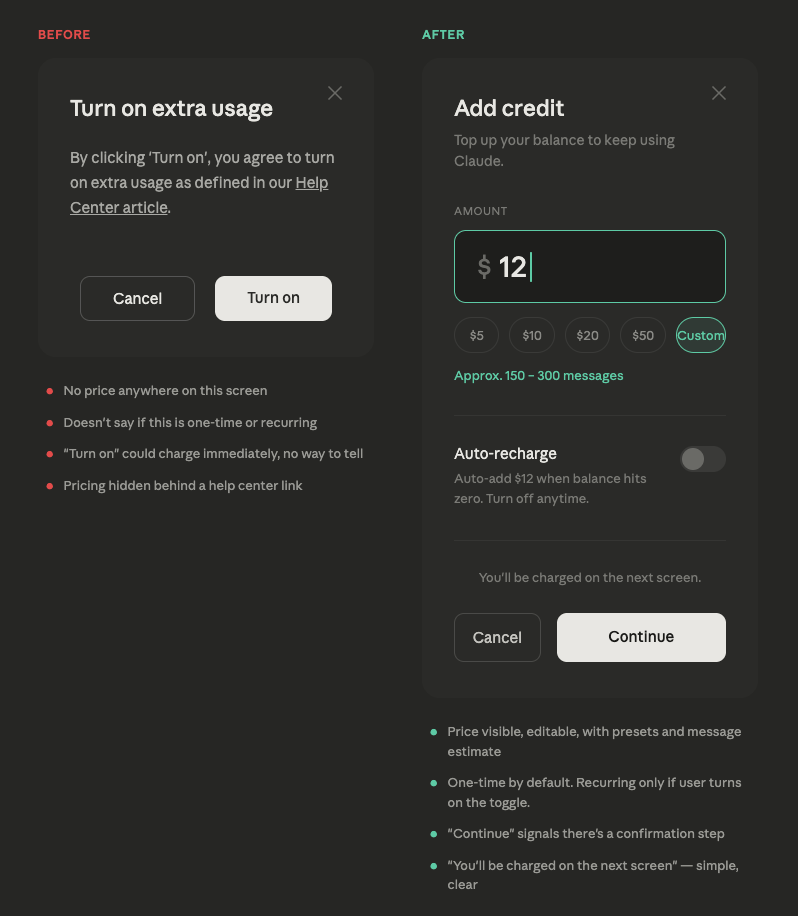
1. Show the cost and what it buys on the same screen.
Don't make users click away to learn what they'll pay. An editable amount, a $5 default, quick presets, and a plain-language estimate like "covers about 60 to 120 messages." One screen, one decision. If your user has to Google your pricing mid-purchase, it's over.
2. Let users control recurring vs. one-time.
A toggle that says "auto-recharge when empty" with a one-line explanation. Default it to off. The user who wants auto-recharge will turn it on, and they'll trust it more because they chose it. Everyone else sees it's off and relaxes.
3. Say what happens when they click.
"You’ll be charged on the next screen." One sentence. Users shouldn't have to gamble money to find out if there's a confirmation step.
Here, I actually spent 2 minutes with Clause to design a simple mockup of the paywall that would make me pay. Hope it didn’t seem mean:
When it backfires:
Honestly, in B2C almost never. If showing your price upfront scares people off, the problem is the price, not the screen. Transparency doesn't kill conversions. Bad pricing kills conversions. Transparency just lets you find out faster.
If you forget everything, remember this:
Every screen that asks for money has one job: answer the user's questions before they have to ask. How much, on what terms, what happens when I click. Get those wrong and you're selling uncertainty. Nobody pays for that.
🎉 Woow, you finished the issue, that’s awesome!
Hi, I’m Anastasia Kudrow, and I write Ghosted.
I am also a product growth consultant. I help SaaS teams apply psychology and PLG to build growth they can actually control. I run my own project, Growing Pains, and also work with one of the leading PLG consulting agencies, ProductLed, led by Wes Bush.
Feel free to follow me on LinkedIn:
https://www.linkedin.com/in/anastasia-kudrow/
Or check out my website, maybe we can work together: https://www.growingpains.consulting/
See you next week!