

I had a case with one of my clients this week. We were running some analysis to figure out how to drive adoption of advanced features and realised a shocking thing: our loyal long-term users barely use any of the advanced features we've built.
More embarrassing, they actually have a need for them, but they solve it with other methods, from spreadsheets to ai chats.
Ohhh my god.
THE CHALLENGE
We all talk a lot about how to onboard new users, because this is usually where the conversion is, and where the growth team spends its energy. But the underestimated move is expansion: the revenue we get from existing accounts as they grow into more of the product over time.
Whenever we enrich our product with something new we hope that since these users already know our product, they’ll discover the new value themselves.
But they don’t.
And they especially don’t when it comes to AI, because AI implementation quite often doesn’t add a new feature. It reimagines how you use the features you already have, and it reimagines the established ways of working that your users have spent months or years building.
You might be thinking: hey, Anastasia, it doesn’t look so bad.
But it is.
If users don’t think they have space to grow in your product (solve more tasks, or solve them in a better way), they will leave it for something where it looks obviously possible.
And here’s why.
THE GAP
In 2008 researchers put expert chess players in front of a board with two ways to win.
One was a familiar five-move checkmate every strong player has seen.
And the other was a less familiar three-move mate that was better.
They had to find the shortest one, and eye-tracking recorded what they looked at.
Most of them spotted the familiar solution quickly, and then said they were still searching for something faster.
But….
Their eyes kept going back to the squares tied to the solution they already had, and not to the ones that would have revealed the better move. They believed they were open to a better option, but their attention had already locked onto the familiar one.
On Ghosted, I usually write about the expectation gap that we need to close. But here, expectation actually plays a wrong trick with us.
People are getting driven to the familiar option because it’s the closest thing to what they expect from our product. They don’t expect us to launch new features by default, because they don’t really think about the product between sessions (I know, hurts every time).
So even when we introduce something better, if it’s not presented in the right way, they’ll still fall back on the old workarounds.
HOW TO WORK WITH IT
Amplitude does two things I really love, and both are worth stealing.
1. Trigger on the behaviour, not on a schedule.
Honestly, a lot of people right now are saying very bad things about tooltips, but guess what, they actually get the job done if they're not static. If you set them up to react to behaviour and suggest a natural next step, why not use them? Fashion aside, almost every PLG’s darling uses them, just in more organic formats than they existed years ago.
Here's an example I really like. The Amplitude bubble shows up in an account I've been actually using, and it appears specifically when I'm doing something manually that could be done in a smarter way. I'm checking a dashboard (I switched to a different tab to hide the data hehe), and it just suggests how I could do the same thing differently and how it can save me time. It's tied to what I'm looking at in that moment, not sent to everyone on a Tuesday morning.

2. Pre-open the new feature so it doesn’t require intent to find.
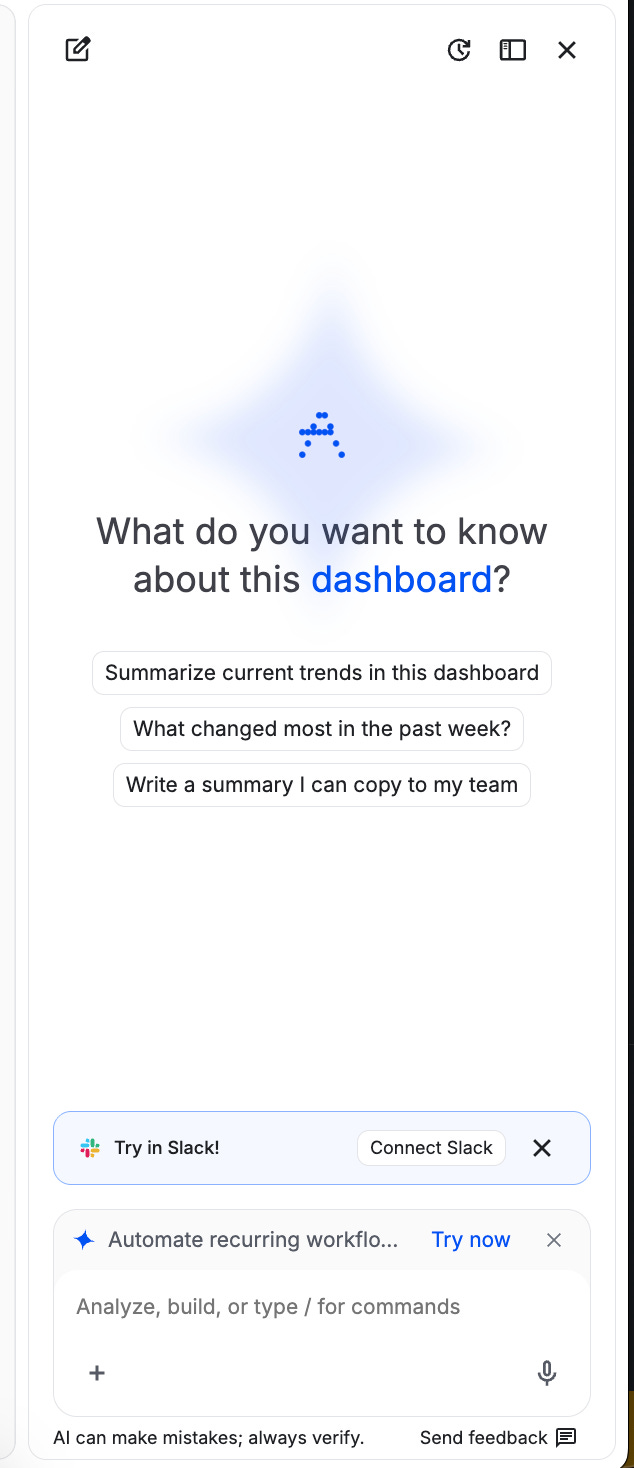
When I open the dashboard, they also open the AI chat by default, and they start it with a very universal question that I can ask about this dashboard. It’s very easy to start, because it’s right there, and it doesn’t require any additional effort from me. Putting the new option on the surface I already opened solves the attention problem before it happens.
If you’re not ready to build any of this, at least stop treating lifecycle emails as the whole answer. Emails are fine as an add-on, but if you still have a product that people use manually, either through your MCP or by logging into the platform, you should be treating the advanced journey the same way you treated the first one, just for more advanced tasks, so you can use any other instruments at your disposal.
An important note: don’t launch an advanced sequence for someone who hasn’t pushed through the initial steps. I saw many times how two of those collapse because of the wrong triggers, and the user ends up with multiple checklists, guides, etc.
ONE THING TO REMEMBER
If someone loves one feature, they don’t automatically become an expert on the whole product. Use cases end, competitors come, and ongoing onboarding can bring as much growth (if not more) as the one within the first session.